How to read this guide
Work through A first sound once. After that, use the contents as a reference. Turn Tips on and hover any control. The window answers in one line.
People also ask
What is Paraflex Alchemy?
A synthesizer. You load up to six chemical elements, play them from MIDI or the on-screen keys, and hear the reaction between them.
Is Alchemy a VST?
This release is VST3 and the standalone app on Windows and macOS. Audio Unit on macOS, AAX on macOS, and AAX on Windows come later.
What is the difference between Alchemy mode and Keys mode?
Alchemy mode plays each element at its own pitch, transposed from the blue reference key. Keys mode plays the notes you play, with a small detune that belongs to the element.
How many elements can I load?
Six at once, chosen from 118 real elements plus six Void tones.
Does Alchemy work in a DAW?
Yes. It is an instrument track. The project stores the chamber, the positions, and the volumes.
What Alchemy is for
Use it when you want a keyboard part with a character you cannot get from a stack of ordinary oscillators.
- Sound design. Combine elements, drag them around the chamber, and turn the Reactor up until the chemistry is obvious.
- Playable parts. Switch pitch to Keys and play chords and melodies the way you would any other instrument.
- Textures. Long envelopes, reverb, and a slow Reactor setting make pads and atmospheres.
- Rhythmic and gritty parts. Short envelopes, Drive, Geiger, and Delay lock to the song.
Alchemy does not replace your mixer. It is the instrument. Level it like any other synth, then use your host’s mix tools around it.
What you need
| macOS | macOS 12 or later, Apple silicon or Intel |
| Windows | 64-bit Windows 10 or later |
| Sound | An audio interface, or the computer’s own output |
| Playing | A MIDI keyboard is the best way to play. The on-screen keys work without one |
| Formats | This release: VST3 and the standalone app on Windows and macOS. Audio Unit and AAX are not in this release. |
The footer of the window shows the version and the format you opened. This release opens as VST3 or the standalone app. Audio Unit and AAX are not in the installer yet.
Close your host before you install or update. An open host often keeps the previous copy in memory until you quit it completely.
Install
macOS
- Double-click the installer package.
- If macOS says it cannot check the installer, close that warning, open System Settings → Privacy & Security, choose Open Anyway, and enter your password.
- Let the installer finish. It needs an administrator password because the plugins are installed for every user on the Mac.
What it places:
- VST3:
/Library/Audio/Plug-Ins/VST3/Paraflex Audio/Paraflex Alchemy.vst3 - Audio Unit:
/Library/Audio/Plug-Ins/Components/Paraflex Alchemy.component - Standalone:
/Applications/Paraflex Alchemy.app - AAX, when the installer includes it:
/Library/Application Support/Avid/Audio/Plug-Ins/
If a host says the plugin is damaged, the file has been quarantined. Quit the host and clear the quarantine on the plugin folders and the standalone app, then open the host again:
xattr -dr com.apple.quarantine "/Library/Audio/Plug-Ins/VST3/Paraflex Audio"
xattr -dr com.apple.quarantine "/Library/Audio/Plug-Ins/Components"
xattr -dr com.apple.quarantine "/Applications/Paraflex Alchemy.app"
Windows
Run the setup and accept the license. A full install includes the VST3 and the standalone application. Choose the AAX component when you use Pro Tools and the installer offers it.
- VST3:
C:\Program Files\Common Files\VST3\Paraflex Alchemy.vst3 - Standalone:
C:\Program Files\Paraflex Audio\Paraflex Alchemy\Paraflex Alchemy.exe - AAX, when included:
C:\Program Files\Common Files\Avid\Audio\Plug-Ins\
The setup adds any system piece the window needs. If the window later opens as a plain panel of controls, run the setup again and restart the host.
After installing
Rescan plugins.
- Logic Pro: Settings → Plug-in Manager → Reset & Rescan Audio Units.
- Other hosts: use that host’s plugin rescan. Ableton Live, Reaper, Cubase, Bitwig, and Studio One all load the VST3.
- Pro Tools loads the AAX only. If your installer did not include AAX, Pro Tools will not list Alchemy.
If the plugin appears twice, a second copy is probably in your user plugin folder (~/Library/Audio/Plug-Ins on macOS). Keep the copy in the system folders above and remove the extra one, then rescan.
Alchemy selected in a typical host plugin list, so a new user can see the name to search for.
Open it and play
Inside a host
- Create a MIDI or instrument track.
- Load Paraflex Alchemy.
- Arm the track or turn input monitoring on.
- Play the keyboard.
Standalone
Open Paraflex Alchemy from Applications on macOS, or from the Start menu on Windows. In the application menu, open the audio and MIDI settings, choose your output device and your keyboard, then play. The on-screen keyboard also works with the mouse.
The standalone audio and MIDI settings, with an output device and a keyboard selected.
License
Click Activate at the right of the top rail.
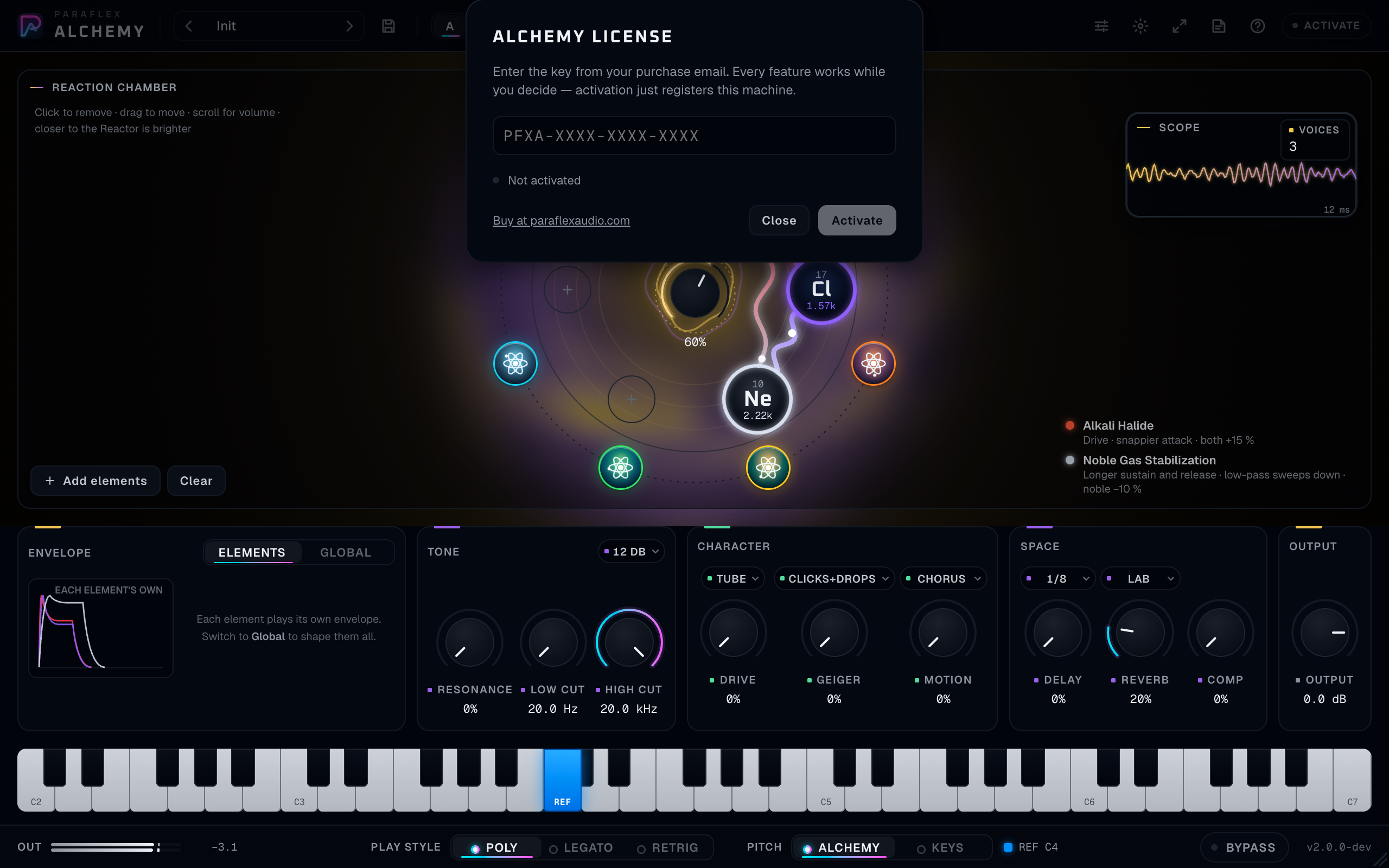
PFXA-XXXX-XXXX-XXXX pattern.- Your key looks like
PFXA-XXXX-XXXX-XXXX. Paste it or type it. The field formats itself. - Until this computer is activated, Alchemy stays silent, including when Bypass is on. Activate registers this computer and the sound comes back at the same reported latency.
- One key runs on one computer at a time. To move it, open the sheet on the old computer and choose Deactivate, then activate on the new one.
- After a successful activation the plugin keeps working away from the internet until the date in that activation, and then for seven more days. The sheet tells you how many days remain. When that period ends, Alchemy is silent until you connect and open it.
- Buy at paraflexaudio.com is on the sheet if you do not have a key yet. The purchase, tax, and refund are handled there. Questions about the plugin go to support@paraflexaudio.com.
- The chip on the rail reads Licensed when this machine is activated, including while you are offline inside the allowed period.
A first sound
Do this once, before you explore.
- Open the plugin. If a preset is already loaded, click the preset name and choose Init.
- Click Add elements.
- Click Sodium (Na) and Chlorine (Cl). Close the table with the X or the Escape key.
- Leave Pitch on Alchemy. The blue key on the keyboard is the reference key, C4 until you change it.
- Play and hold that blue key. You should hear both elements at their own pitches, beating against each other.
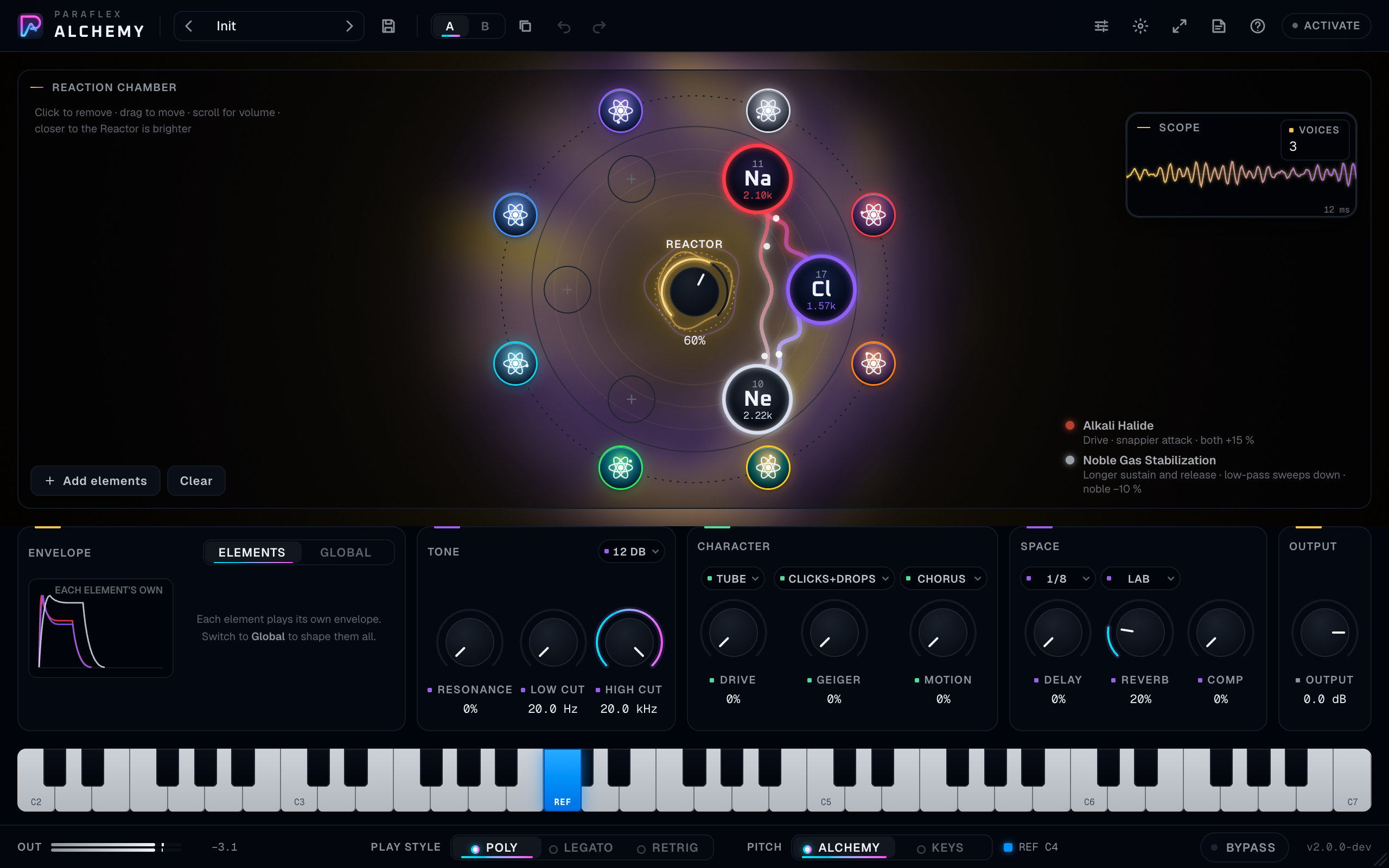
- Drag the two orbs toward each other and toward the centre. Turn Reactor up if the legend still says the reactor is off.
- The legend should name Alkali Halide. That is table salt, and it is the simplest way to hear a reaction.
- Switch Envelope to Global, lengthen Release, and raise Reverb a little.
Sodium and chlorine in the chamber, close together, Reactor up, the Alkali Halide line visible in the legend, and the reference key held.
You now have the whole idea: elements are the oscillators, position is tone and chemistry, the bench is the mix.
The window, from top to bottom
Every Paraflex plugin shares this frame. Alchemy’s own controls sit in the chamber and on the bench.
Top rail

| Control | What it does |
|---|---|
| Preset arrows | Step to the previous or next preset |
| Preset name | Opens the browser. A dot in front of the name means you have changed the preset |
| Save | Saves a user preset. Type a name and a category. Enter saves, Escape cancels |
| A / B | Two setups to compare. Switching is instant and can be undone |
| Copy | Copies the side you are hearing onto the other side |
| Undo / Redo | Undoes and redoes moves you made in this window |
| Advanced | Reference key, glide, key tracking, and the “ask before removing” preference |
| Aura | Full, Subtle, or Off. This is only the glow. The sound stays the same |
| Size | S 80%, M 100%, L 125%, XL 150%. The layout stays in proportion |
| Guide | Opens this guide on paraflexaudio.com |
| Tips | Turns hover explanations on and off. Leave them on while you learn |
| License chip | Opens activation |
The size and the glow are remembered. Tips stay as you left them.
The first time you open Alchemy, a short walkthrough points at the chamber and at Play style and Pitch, then at Guide and Tips. Skip it or step through it. It does not change the sound, and it does not come back on this computer.
#### Preset browser
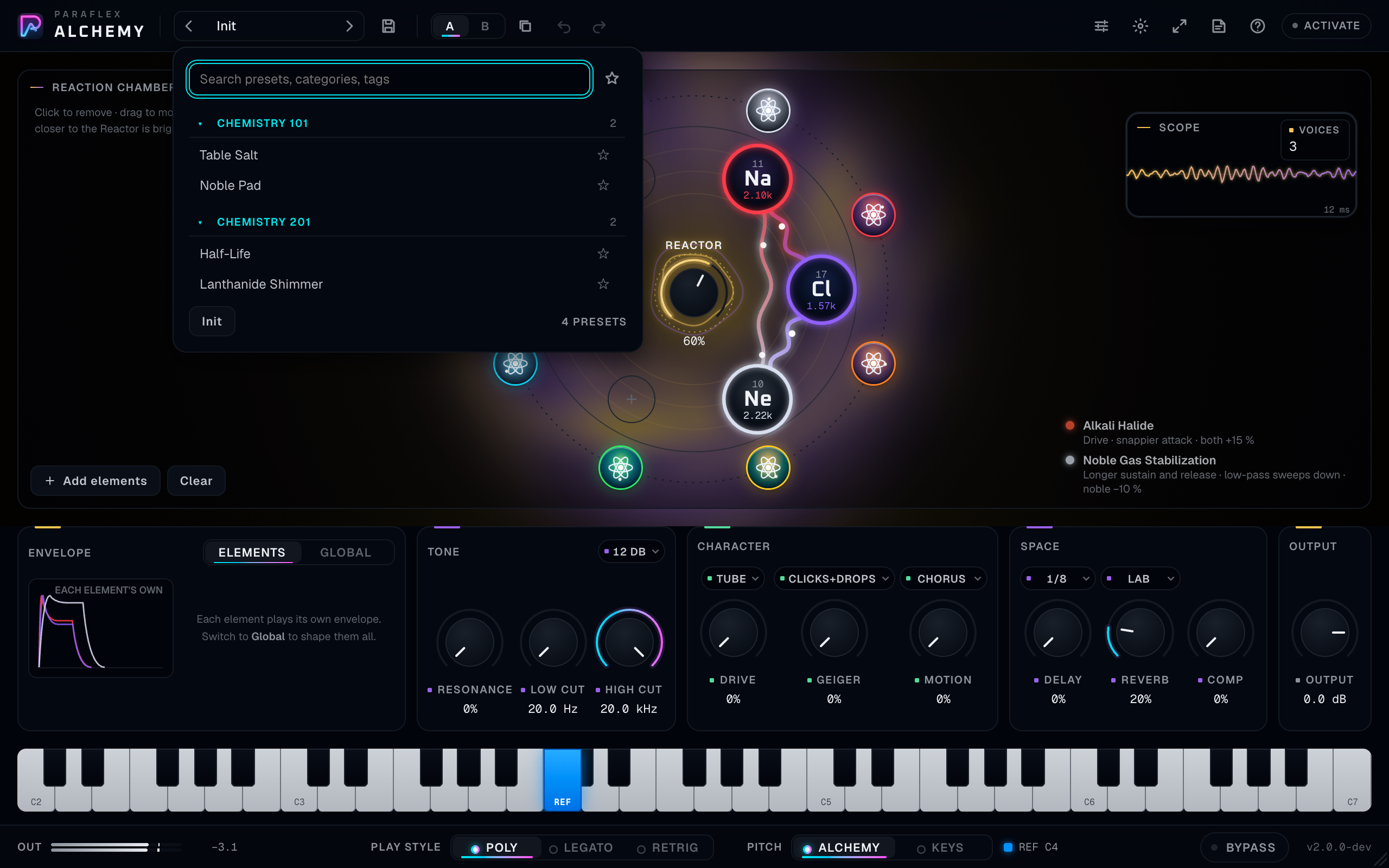
- Search matches the name, the category, and the tags.
- The star button shows favourites only. Star a preset to keep it. Stars are yours; they do not change the sound.
- Factory presets cannot be deleted. User presets can, with the × on that row.
- Init returns Alchemy to a clean starting point.
- A loaded preset’s name is shown on the rail. Edit anything and the dot appears. Save if you want to keep that edit. The project still stores what you hear even when you do not save a preset.
Factory presets are grouped as Signature, Chemistry 101, Chemistry 201, Reactions, Harmonious, Waveforms, and Words. Chemistry 101 is families of elements. Chemistry 201 and Reactions are pairs chosen so a particular reaction is easy to hear (H2O - Water, Salt Formation (Na+Cl), Phaser (H+O)). Harmonious groups elements into musical intervals. Words spells names with element symbols (FUNK, LiFe, SNaP). Open the browser and read the list there; it is always the current set.
#### What the project remembers
The host project stores the sounding setup: every knob and switch, which elements are in the chamber, where they sit, and how loud each one is. It also stores the preset name and whether you have modified it.
A and B are a comparison while you work. The project keeps the setup you are hearing. If you want both ideas, save two presets, or copy the one you need before you move on.
Undo remembers recent moves in this sitting. It records what you do with the mouse and keyboard in the window. Moves written by host automation belong to the host’s own undo.
Ask before removing is a preference for you, on this computer, in every project. It is under Advanced.
Knobs, everywhere
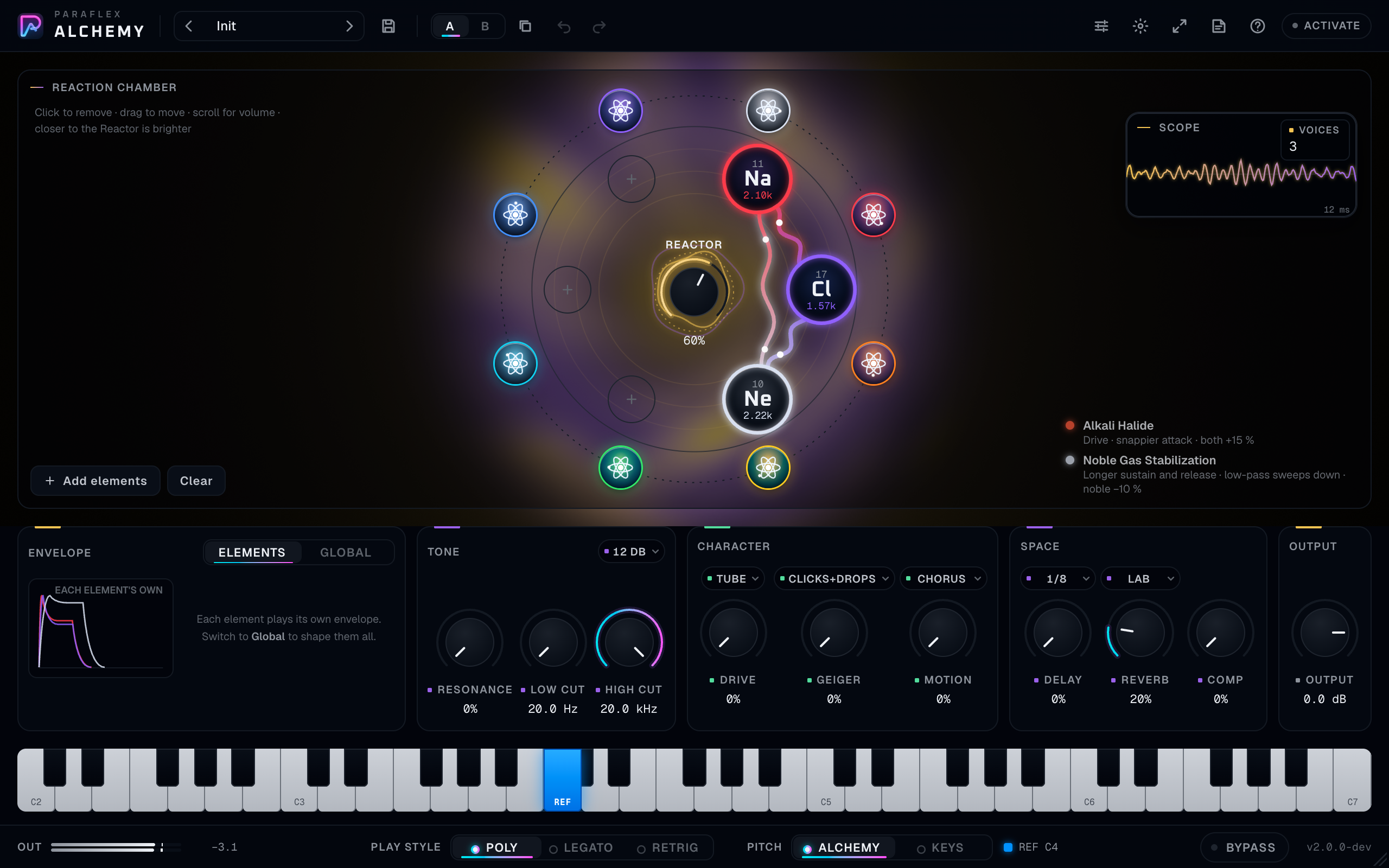
- Drag up or to the right to increase, down or to the left to decrease.
- Hold Shift (or Ctrl) while dragging for a fine adjustment.
- Scroll over a knob to nudge it. Shift makes the scroll finer.
- Double-click a knob to return it to its default. Option-click (macOS) or Alt-click does the same.
- Click the number under the knob and type a value. Enter or clicking away confirms it. Escape cancels the type-in.
- With a knob focused, arrow keys nudge, Page Up and Page Down take larger steps, Home and End go to the ends, Delete or Backspace resets.
- Choice chips (Tube, Lab, Poly, and the rest) can be clicked or scrolled.
The value card waits a moment before it appears, so sweeping the pointer across the bench does not flash a card on every knob. Once one card has shown, its neighbours appear quickly. While you drag, the card stays with your hand.
Footer

- Out is the peak level leaving the plugin, in dBFS. Click the number to clear the peak and the clip hold.
- Play style and Pitch are here because you change them while you play. They are explained below.
- Bypass eases to the dry path. On an instrument the dry path is silence, time-aligned with the processed path, so toggling it does not jump the clock.
- The version and format sit at the right.
Alchemy has no input meter. It makes the sound; it does not receive audio.
The reaction chamber
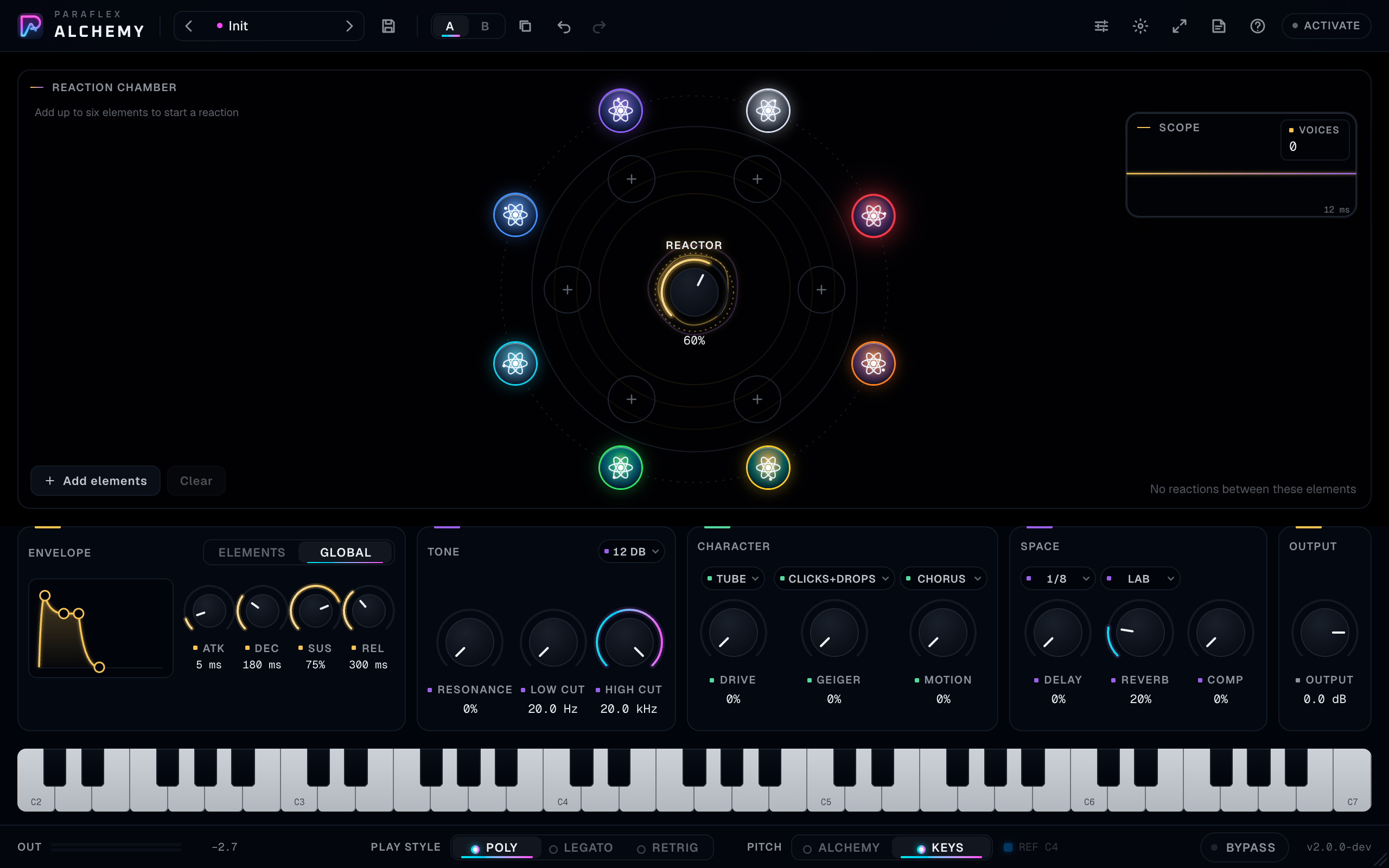
The hint on an empty chamber reads: add up to six elements to start a reaction. With elements loaded it reads: click to remove, drag to move, scroll for volume, closer to the Reactor is brighter.
Adding elements
Three ways in:
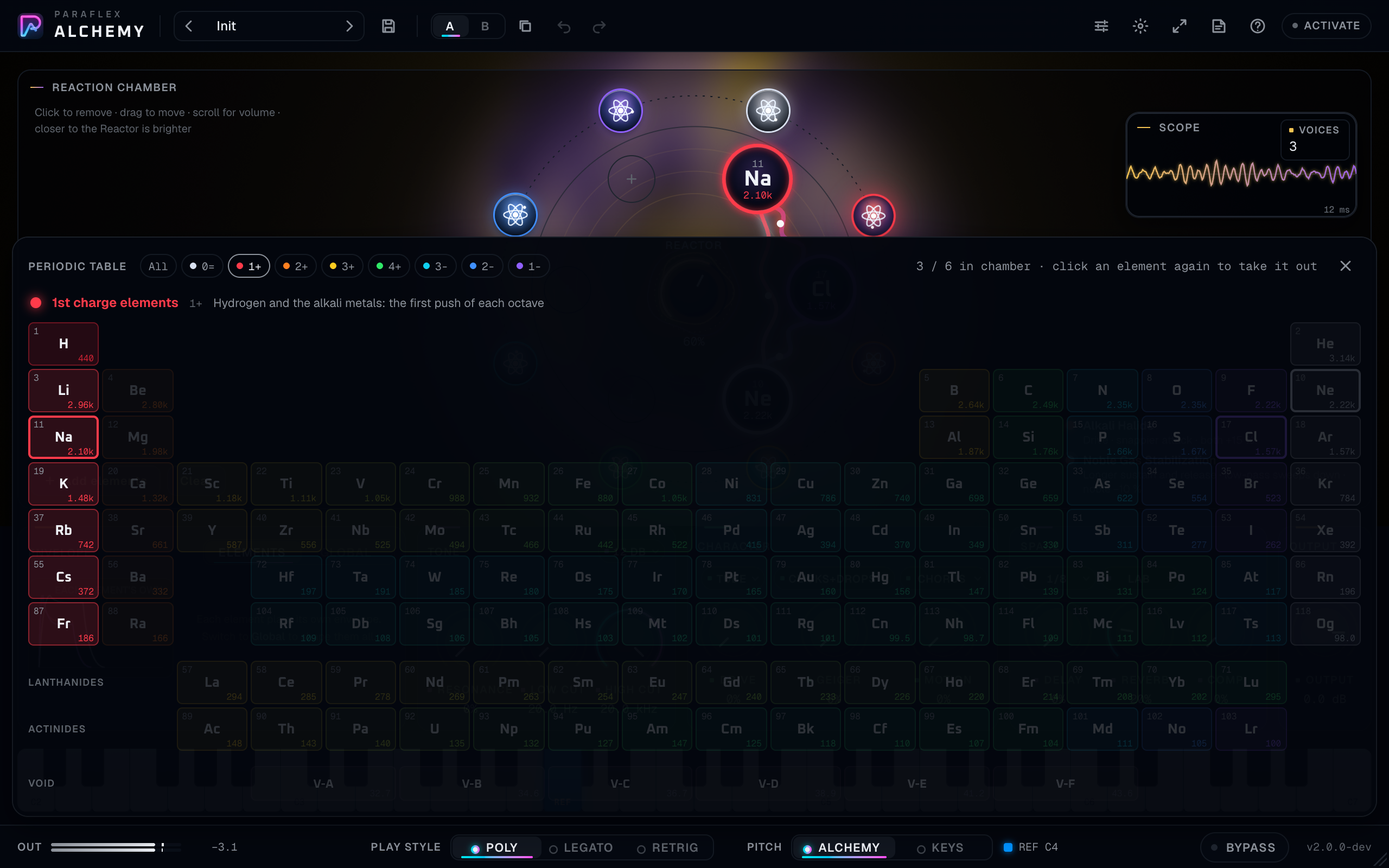
- Add elements opens the periodic table. Click a cell to put it in the first free slot. Click a cell that is already in the chamber to take it out.
- Click a + slot in the ring. The table opens aimed at that slot.
- Click one of the eight family buttons around the chamber. The table opens filtered to that colour family. Click the same family again to clear the filter, or click All.
The chamber holds six elements. A seventh attempt tells you the chamber is full and leaves the sound as it is. The same element cannot sit in the chamber twice.
Clear removes every element. It asks you to confirm only through the per-element question if that preference is on; Clear itself empties the chamber in one step. Use Undo if you cleared by mistake.
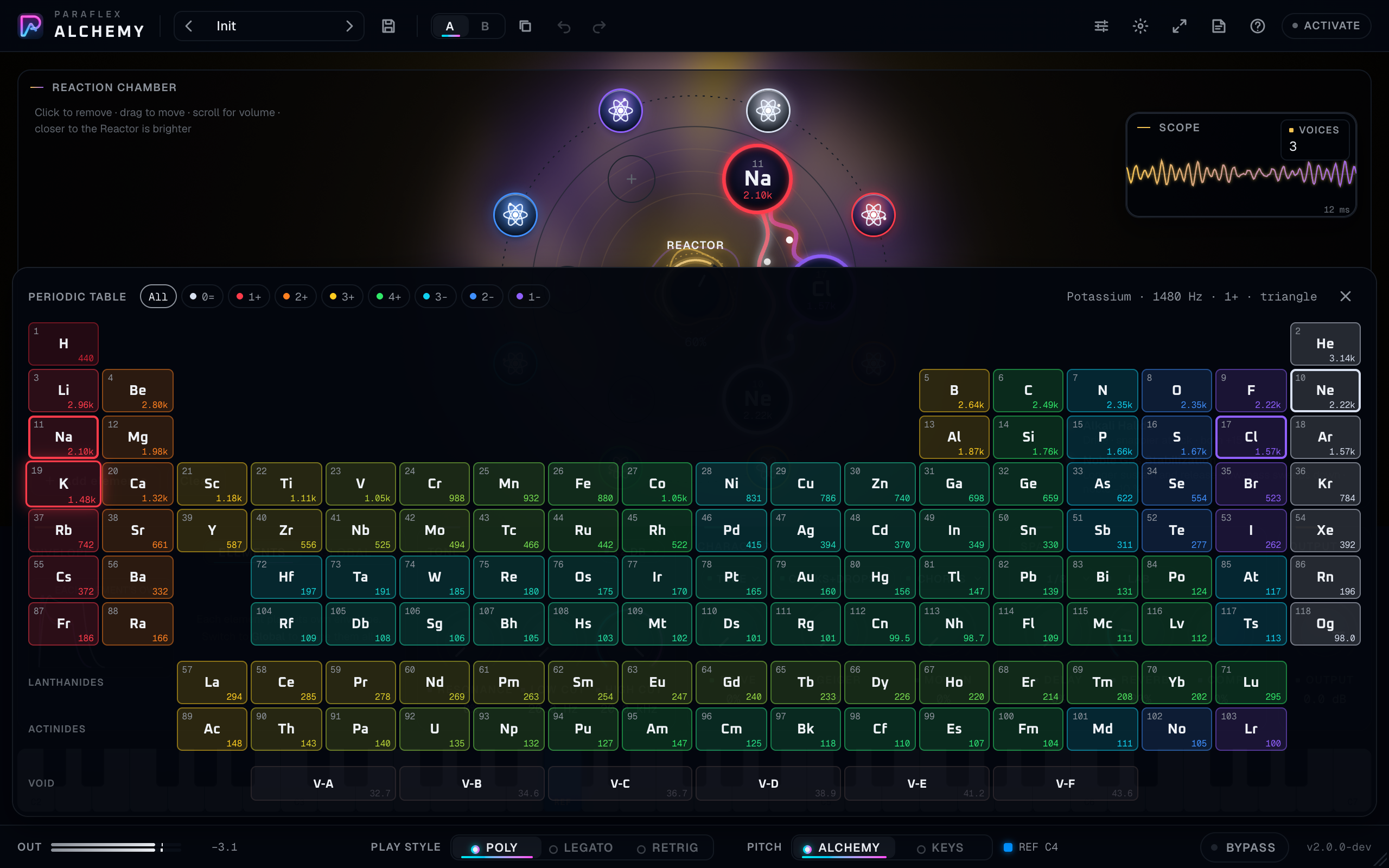
The drawer’s info line is the best legend in the plugin:
- Nothing hovered: how many slots are filled, and a reminder that a second click removes.
- An element hovered: its name, its pitch in hertz, its tone mark, and its waveform (sine, triangle, saw, square, pulse, or noise). If it is already loaded, the line says click to remove.
- A notice replaces that line for a moment when you add or remove, or when the chamber is full.
Escape or the X closes the drawer.
Each cell shows the atomic number (blank for Void), the symbol, and the pitch. Colour is the family. Cells outside the current family filter dim but stay clickable.
The eight families
The buttons around the ring are filters, not sounds of their own. Their labels match the tone marks you see on the cells.
| Mark | Label | What the table says about them |
|---|---|---|
| 0= | Inert | Noble gases: the still point that opens and closes every octave |
| 1+ | 1st charge | Hydrogen and the alkali metals: the first push of each octave |
| 2+ | 2nd charge | Alkaline earth metals: the charge builds |
| 3+ | 3rd charge | Boron group and the charging transition metals |
| 4+ | Amplitude | Carbon group: the peak of the octave |
| 3− | 3rd discharge | Nitrogen group and the discharging transition metals |
| 2− | 2nd discharge | Oxygen group |
| 1− | 1st discharge | Halogens: the last step back toward rest |
Lanthanides and actinides are the two long rows pulled out under the main table, the way a textbook draws them. Void is the last row.
You do not need to memorise chemistry. Hover a family, read the line, then audition two or three of its elements. The pitch in hertz on each cell tells you whether a pair will sit close and beat slowly, or sit far apart and sound like two registers.
Moving, volume, and removing
- Drag an orb to move it. It stays outside the Reactor knob and inside the ring. A drag never removes the element.
- Closer to the Reactor is brighter. Distance from the centre is a high cut on that element. At the centre the element is open and bright. Toward the ring it darkens. This is independent of the master filters on the bench.
- Scroll an orb to change its volume, from silent to full. The ring around the orb fills with its colour. A volume of zero keeps the element in the chamber and takes it out of the chemistry: it makes no sound and it starts no reaction. Bring the scroll back up and it returns.
- Click an orb, or right-click it, or press Delete, to remove it. Alchemy asks first: remove this element? Enter confirms, Escape cancels. Don’t show this again stores that choice for every project. Turn the question back on under Advanced → Ask before removing.
The Reactor
The centre knob is Reactor. It runs from off to full, and it starts a little above halfway.
- At 0 every reaction is off. The legend says so. You still hear the elements, each with its own waveform and its own brightness from position.
- Above 0, pairs that have a chemistry light a bond, and some single elements start a reaction of their own.
- Closer together reacts harder. Orbs that touch react fully. Orbs on opposite sides of the chamber still react, quietly. The last bit of distance before they touch is where you hear the reaction come up fastest.
- Closer to the centre also reacts a little harder than an orb out at the ring, on top of the brightness change.
- The quieter element of a pair holds the reaction back. If you scroll one orb down, the bond with it weakens.
- Reactions ease in over about a second and ease out a little faster, so a move does not click.
Turn the Reactor down when you want the raw elements. Turn it up when you want the chamber to perform.
Bonds and the legend
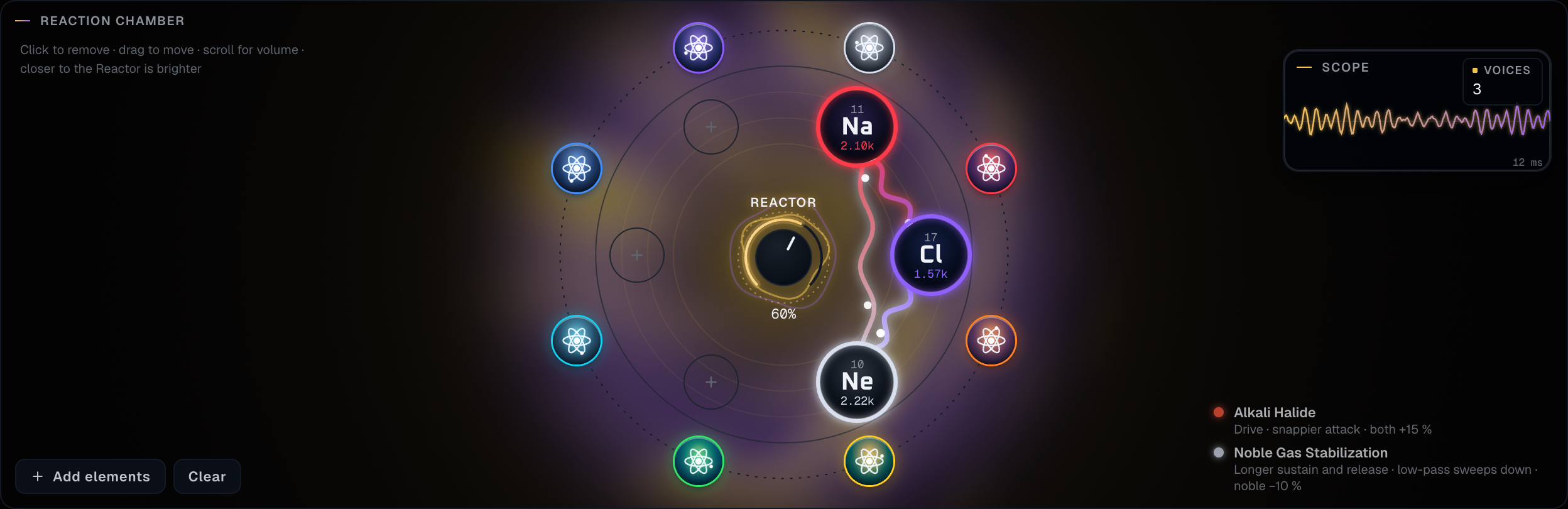
A coloured line is a reaction. A faint dashed line means those two elements do not react. Weak bonds are thin. Strong bonds pull tight, thicken, and glow. They bend around the Reactor so the knob never covers a connection. Bonds draw while the Reactor is above zero.
The legend at the side of the chamber lists every reaction that is currently happening, strongest first, with a short line about what it does to the sound. If nothing between these elements reacts, the legend says so. That is normal. Many pairs are simply two oscillators.
Hover an orb to read the name of each bond touching it.
Which combinations react
Each pair follows one reaction: the most specific match. A single element can also carry its own reaction at the same time as a bond.
Pairs
| You put in | Reaction | What you hear |
|---|---|---|
| An alkali metal (Li, Na, K, Rb, Cs, Fr) and a halogen (F, Cl, Br, I, At, Ts) | Alkali Halide | Drive, a snappier attack, both a bit louder. This is salt |
| Hydrogen and a halogen | Acid Formation | A low cut that thins the body |
| An alkaline earth (Be, Mg, Ca, Sr, Ba, Ra) and a halogen | Alkaline Earth Halide | Flanger, a small attack lift, a little louder |
| Hydrogen and oxygen | Water Formation | A phaser sweep |
| Carbon, silicon, phosphorus, or sulfur, together with oxygen | Combustion | A flanger whoosh, and brighter |
| Oxygen and a metal | Metal Oxidation | The high cut closes, Geiger rises, the metal eases back |
| Hydrogen with carbon or nitrogen, carbon with nitrogen or sulfur, or nitrogen with oxygen | Organic Bond | A tremolo pulse |
| Two metals | Metal Alloy | Chorus, a few cents of detune, a little louder |
| A noble gas with anything that is not a noble gas | Noble Gas Stabilization | Longer sustain and release, a low-pass sweeping down, the noble gas a little quieter |
Noble gases are helium, neon, argon, krypton, xenon, radon, and oganesson.
On their own, while the Reactor is up:
| Element | Reaction | What you hear |
|---|---|---|
| Anything in the lanthanide row | Lanthanide Oscillation | Phaser, a slow volume pulse, a few cents of detune |
| Anything in the actinide row | Actinide Decay | Grit, heavy Geiger, extra detune, and a fade that restarts every few seconds |
| Other radioactive elements | Radioactive Decay | Distortion, Geiger clicks, random level drops |
Void elements do not react with anything, including each other. They are extra tones, not chemistry.
Two reactions never stack on the same pair. Sodium and chlorine are Alkali Halide, not also an alloy. An actinide that is also a metal can alloy with another metal and decay on its own at the same time. Watch the legend. It is the authority, not your memory of the table.

Void
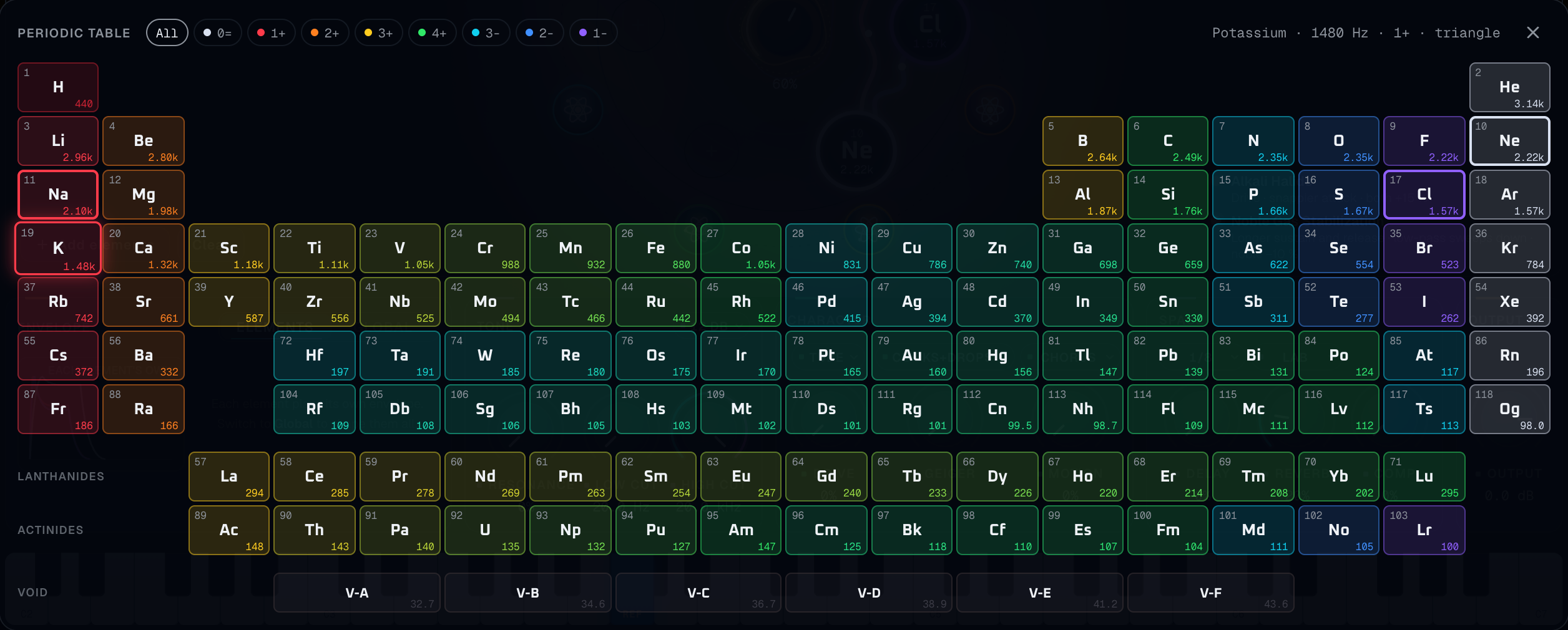
Void-Alpha, Void-Beta, Void-Gamma, Void-Delta, Void-Epsilon, and Void-Zeta sit under the table. They are low noise tones. Use one under a bright element when you want weight without a pitched oscillator. Scroll its volume carefully. Low noise eats headroom.
Scope
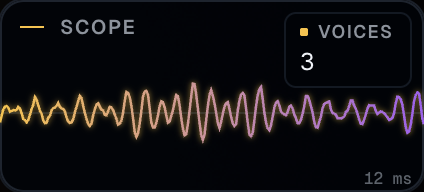
The scope is a short window of the sound the elements are making together, about twelve milliseconds, before you think of it as a mix meter. Voices is how many element-notes are sounding. Drag the panel anywhere inside the chamber. It is a display. It does not change the audio.
Pitch: Alchemy and Keys
The Pitch control in the footer is the most important musical choice in the plugin.


Alchemy
The reference key plays every element at its own designated pitch. Other keys transpose the whole chamber from there, together, so the relationships between elements stay put.
The reference key is marked REF and drawn blue on the on-screen keyboard. The footer also prints it, for example REF C4. Change it under Advanced → Reference key, from C1 to C7. The default is C4.
This mode is how the chemistry was designed to be heard. A pair that beats slowly on the reference key beats at that same musical rate everywhere you transpose. Use it for drones, sound design, and parts where the elements are the chord.
Keys
Elements follow the keyboard. Each note you play is that note, and each element keeps a small fixed detune of its own so a stack still has a fingerprint. Use this when you want melodies, bass lines, and ordinary chords.
The reference key does nothing musical in Keys mode. The blue mark hides.
You can switch modes while notes are held. Let them go and play fresh notes so you can hear the new rule cleanly.
Play style
| Style | Behaviour |
|---|---|
| Poly | Chords. Each key runs one voice for every element in the chamber. Playing the same key again restarts that note cleanly instead of stacking a second copy on the tail |
| Legato | One note at a time. A new key moves the pitch and does not restart the envelope. Release it and the previous held key returns |
| Retrig | One note at a time. Every new key restarts the envelope from the attack. The previous held key still returns when you release |
There is room for large chords: up to 128 voices. Six elements means each key costs six voices, so a big sustained stack will eventually steal. The oldest note that is already releasing gives way first, then the oldest note overall. For normal playing you will not hear this.
Glide
Advanced → Glide runs from off to two seconds. It glides from the last note you played, in Poly, Legato, and Retrig. At zero it is off. Glide is most obvious in Legato, and it is still real in Poly: each new voice slides in from the previous note.
Key tracking
Advanced → Key track is Off, 25%, 50%, or 100%. It moves each element’s distance filter with the note.
The centre of that tracking is the reference key in Alchemy mode, and C4 in Keys mode. At 100%, a note an octave above the centre opens the filter an octave. Off leaves the brightness exactly where you dragged the orb, on every key. The filter never closes so far that it swallows the note’s own pitch.
The on-screen keyboard
The keys run from C2 to C7. Click or drag across them. Keys your MIDI keyboard is holding light up as well. MIDI and the on-screen keys play the same instrument.
MIDI expression
| Control | Effect |
|---|---|
| Note and velocity | Velocity shapes loudness, with a soft curve at low velocities so quiet playing stays quiet |
| Pitch bend | Plus or minus two semitones, on every sounding voice, in both pitch modes |
| Modulation wheel | Vibrato, none at the bottom of the wheel and about a semitone deep at the top, at a steady rate |
| Sustain pedal | Holds notes after you release the keys, until the pedal lifts |
| All notes off | Releases held notes |
| All sound off | Cuts the sound quickly |
Aftertouch is not assigned.
Envelope
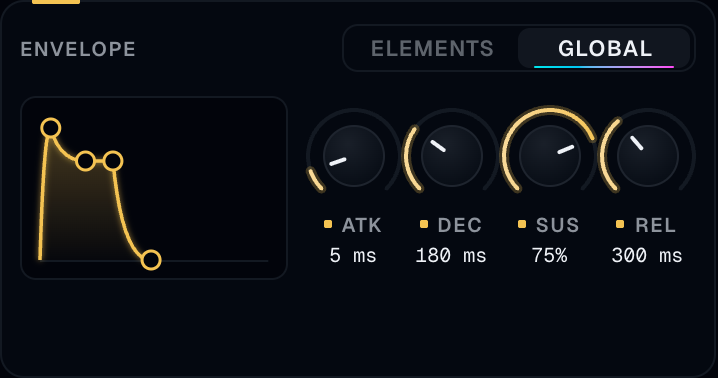
| Mode | What happens |
|---|---|
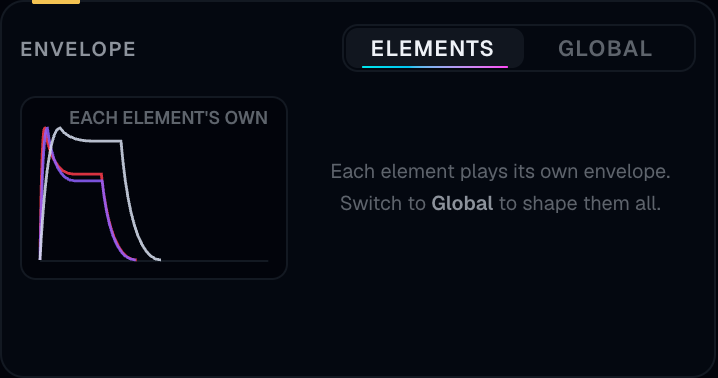
| Elements | Every element plays the envelope it was given. The graph draws each one in its colour. You cannot drag the nodes. This is the default, and it is why two elements in one chamber can speak with different attacks |
| Global | Your Attack, Decay, Sustain, and Release shape every element, in Alchemy mode and in Keys mode |
Switching mode does not restart notes you are already holding. Those notes finish on the envelope they began with. New notes use the mode you just chose.
| Knob | Range | Starts at |
|---|---|---|
| Attack | 1 ms to 10 s | 5 ms |
| Decay | 1 ms to 10 s | 180 ms |
| Sustain | silence to full | 75% |
| Release | 1 ms to 10 s | 300 ms |
In Global mode you can drag the graph. The attack node, the decay-and-sustain corner, the sustain level, and the release node all move, and the knobs follow. Time on the graph is spaced so short settings stay easy to grab.
Reactions can still push an element’s attack, sustain, or release while Global is on. The legend tells you when that is happening. The knobs remain your base.
Tone
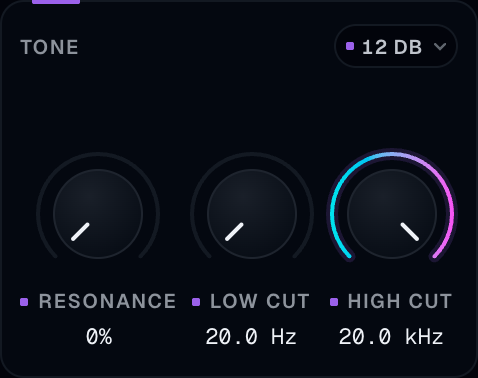
These filters sit on the whole instrument, after the elements. They are separate from the brightness you get by dragging an orb.
| Control | Range | Off means |
|---|---|---|
| Low cut | 20 Hz to 20 kHz | 20 Hz, fully open |
| High cut | 20 Hz to 20 kHz | 20 kHz, fully open |
| Resonance | none to full | The resonance of both cuts together |
| Slope | 12 dB or 24 dB | How steep both cuts are |
A practical starting point is Low cut around 40–80 Hz if the patch has no bass job, and High cut left open until the patch is harsh. Resonance is a colour, not a default. A little of it on a moving high cut is enough.
Character
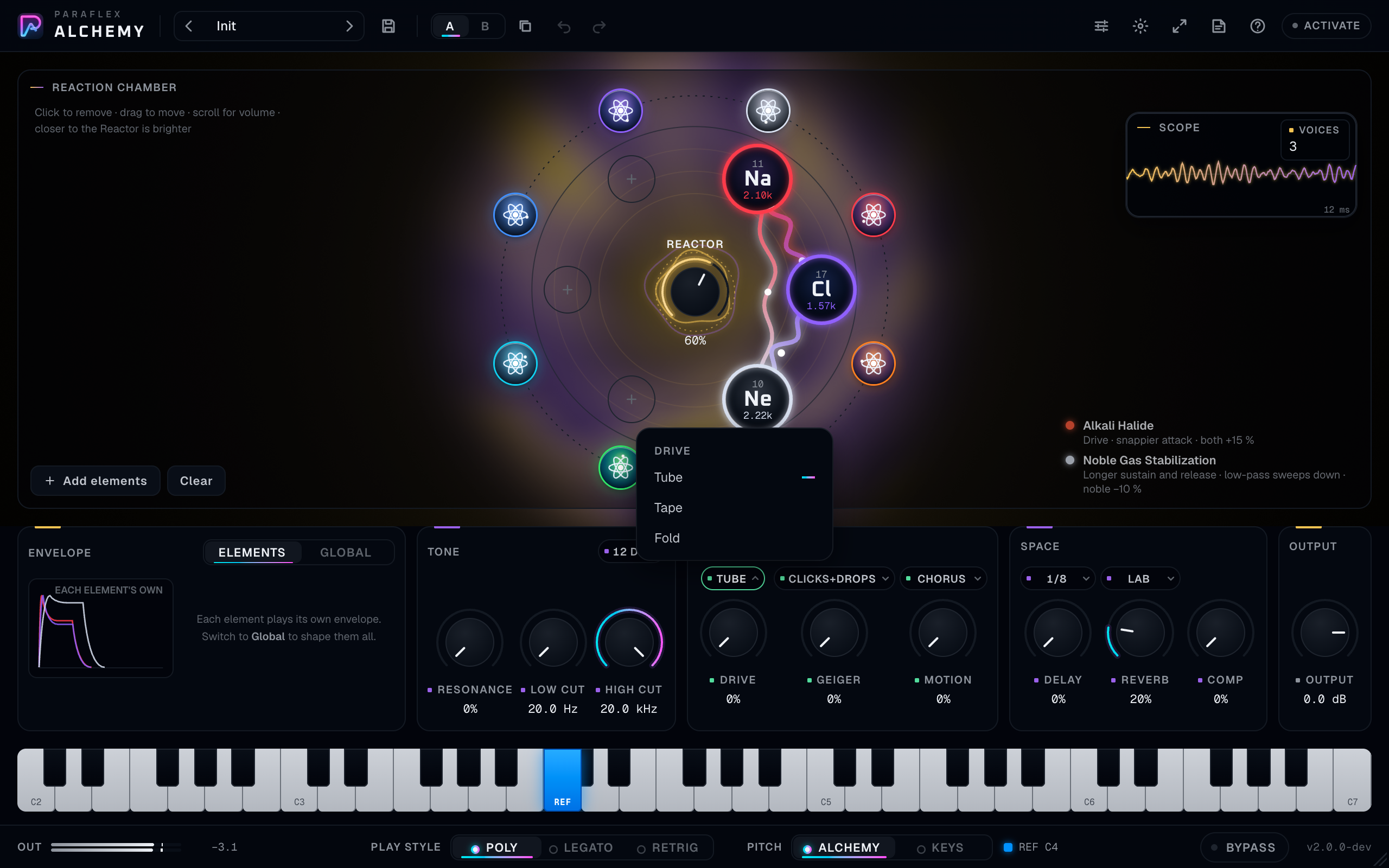
Drive
Drive is the amount. The chip above it picks the circuit:
- Tube — warm, asymmetric.
- Tape — soft and round.
- Fold — metallic, the wave folding back on itself.
It is oversampled so the grit stays on the sound you asked for. Start low. Fold in particular gets bright and loud.
Geiger
Geiger is the amount of radiation crackle you add on purpose. The chip picks the shape:
- Drop — short level dropouts.
- Click — counter clicks.
- Clicks+Drops — both. This is the default type, with the amount at zero so you hear nothing until you turn it up.
Radioactive reactions add their own crackle on top of this knob. If a patch is already crackling with the knob at zero, look at the legend before you hunt for a fault.
Motion
Motion is the amount. The panel above the knob sets:
- Type: Chorus, Phaser, Flanger, or Tremolo.
- Rate, from 0.1 Hz to 20 Hz, starting at 1.5 Hz.
- Sync, off by default. On, the rate locks to the host tempo.
Reactions also run chorus, phaser, flanger, and tremolo of their own. If the Motion knob is at zero and the sound is still moving, a bond is doing it. That is the chamber, and you steer it with distance and the Reactor.
Space
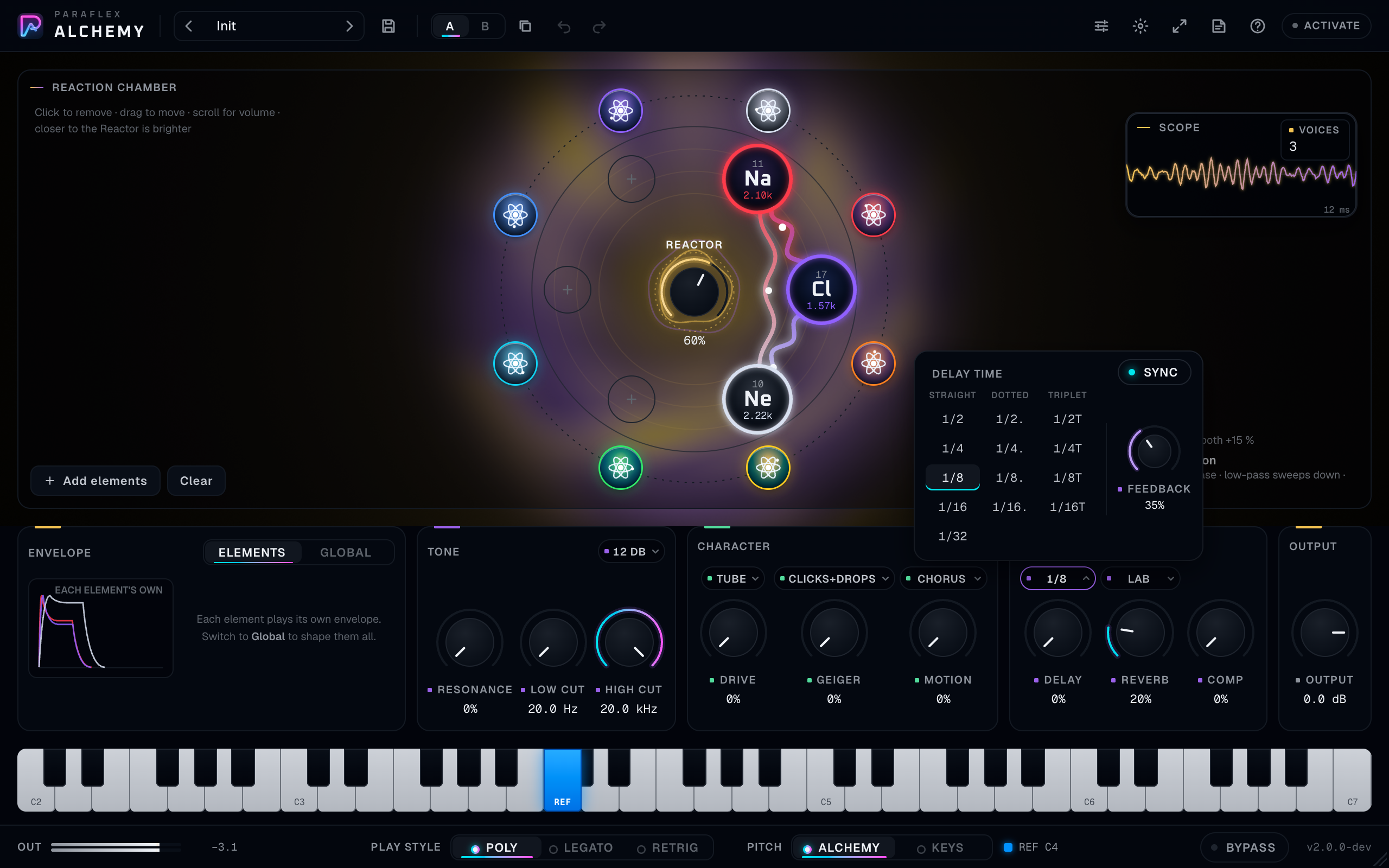
Delay
Delay is the send. Above the knob:
- Sync is on by default. Division picks the note value: 1/2, 1/2 dotted, 1/2 triplet, and the same three for 1/4, 1/8, 1/16, and 1/32. The default division is 1/8.
- Sync off: Time from 10 ms to 2 s, starting at 300 ms.
- Feedback from none to 95%, starting at 35%. It stops short of a runaway.
If the host is not playing, synced delay still has a tempo to follow (the host’s tempo, or its default). Press play when you want the repeats locked to the song you are hearing.
Reverb
Reverb is the send, starting a little open so an empty-looking init is not bone dry once elements arrive. The chip picks the room:
- Lab — small, close.
- Hall — a musical room.
- Cavern — long and dark.
Comp
Comp is a glue compressor on the whole instrument, with makeup so the level does not collapse as you squeeze. Use it to hold a stack of elements together. If you need a hard ceiling, do that on a later plugin. Alchemy’s output knob is the level; Comp is the glue.
Output
Output runs from −60 dB to +12 dB and starts at 0 dB. This is the level that hits the track. Set it so the footer meter lives comfortably under the top, with peaks often around −12 to −6 dBFS while you design, louder only when the part is meant to be hot.
Per-element volume is musical balance inside the chamber. Output is the fader. Do not turn every orb to full and then pull Output down to −40 as your only mix move. Scroll the loud element down so the Reactor and the filters see a sensible balance.
Signal path, in playing order
This is the path you can hear, from the key to the track.
- The note, the pitch mode, glide, pitch bend, and the modulation wheel decide the pitch of each element.
- Each element speaks with its waveform and its own envelope, or with the global envelope.
- Distance from the Reactor darkens that element. Key tracking can move that darkness with the note.
- The Reactor and the distances between orbs apply that pair’s reaction, and any self-reaction, on the element.
- Element volumes balance the chamber.
- Tone (low cut, high cut, resonance, slope) filters the mix.
- Drive, Geiger, and Motion colour it.
- Delay and reverb add space. Comp glues it.
- Output sets the level you record.
Bypass eases back to silence, aligned in time, so you can compare “plugin on” with “plugin out” without a timing jump on the track.
Working habits that hold up
These are the practices that show up in every serious instrument manual, applied to this one.
Start from Init or from one factory preset, not from a pile of yesterday’s automation. Hear one idea, then move.
Get the chamber right before the effects. If the elements are wrong, reverb will only make them wrong in a larger room. Balance orb volumes, set distance, then open the bench.
Use Alchemy mode to design and Keys mode to perform. Design the beating and the reactions on the reference key. Switch to Keys when the part has to sit on the song’s pitches. Save both if you need both.
Keep the Reactor purposeful. Full Reactor on six unrelated elements is a fog. Two elements, close together, at a moderate Reactor, teaches you the reaction. Add a third only when you can name what it is doing.
Leave headroom. Watch Out. If the meter pins, lower Output or the loud orbs. Drive and Fold add level. Geiger dropouts do not, but the clicks do.
Treat reactions as modulation you can see. Before you automate Motion, look at the legend. You may already have tremolo, flanger, or a filter sweep from the chemistry, and automating a second copy of the same effect will fight it.
Automate the musical moves. Good automation on Alchemy is Reactor, an element volume, high cut, delay send, and the reference key. Automating six things at once makes the preset impossible to reuse.
A/B the last change. Copy to the other side before a risky edit. Switch back. If you cannot hear the improvement in one pass, keep the earlier side.
Save a preset when a chamber is worth keeping. The name should say the job (Soft salt pad, Keys bass Na Cl) and the category should be one you can search later. The project saves the sound either way. The preset is how you find it on the next song.
Print MIDI, keep the plugin. Alchemy is deterministic enough to leave in the session. Printing a track is for commitment and for handing a session to someone without the plugin, not something you must do to hear it correctly.
Check the part in the song, not only soloed. A bright chamber that sounds expensive alone often needs the high cut pulled down once the vocal is in.
For live playing, use a comfortable buffer and Legato or Retrig for mono lines. Poly is for chords. Glide at a small value (a few tens of milliseconds) sells a mono lead without turning it into a portamento effect.
Recipes
Salt pad
Na and Cl, close to each other, a little out from the Reactor so they are warm rather than harsh. Reactor around 60%. Envelope Global, attack about half a second, release about two seconds. Reverb on Hall, send moderate. Pitch Alchemy. Hold the reference key and nearby keys.
Water atmosphere
H and O. Drag them into the inner half of the ring. Reactor up until the legend says Water Formation. High cut down until the phaser is soft. Cavern reverb, long release, Alchemy mode, low reference key.
Metal lead
Two metals, for example Fe and Cu, so the legend says Metal Alloy. Keys mode, Retrig or Legato, short attack, glide around 40–80 ms, Drive on Tube a little open, Motion chorus very low. Play single lines.
Radioactive texture
An actinide, Reactor up, Geiger knob still at zero so you can hear the element’s own decay. Then add a noble gas across the chamber for Noble Gas Stabilization if you want the texture to breathe longer. Alchemy mode. Do not stack six radioactive elements. One is already a lot of crackle.
A chord you can play
Pitch set to Keys, three elements from a Harmonious preset or of your own choosing, Envelope Global with a piano-like attack and a medium release, Reactor low so the chemistry is a seasoning. Play the chord on the keyboard. If the elements’ private detune is too wide, you are hearing their fingerprint. That is part of them. Choose simpler waveforms (hover the cells) if you want a calmer chord.
Bass
One low element, or a low element plus a quiet Void for air. Keys mode, Legato, glide short, Low cut only a little open, High cut well down, Comp a little on, Delay off. Play low on the keyboard. Check the Out meter. Low noise and low oscillators get loud fast.
Common questions
I hear nothing. The track is not armed or monitored. The chamber is empty. An orb’s volume is scrolled to zero. Output is down. Bypass is on. The standalone has no audio device. The host is playing a MIDI channel this track does not receive.
I only hear one pitch no matter which key I press. Pitch is on Alchemy and you are only playing near the reference key, or Glide is long and Play style is Legato so the pitch is still sliding. Look at the footer. Alchemy on the reference key is supposed to sound like the elements’ own pitches.
The elements are out of tune with my song. That is Alchemy mode. Switch Pitch to Keys. Each element still has a small private detune. That detune is the element. If you need a perfectly equal stack, use one element.
A knob is at zero and the sound is still chorusing, or crackling, or sweeping. Read the legend. A reaction is doing it. Move the orbs apart, lower the Reactor, or take one element out.
The sound thins when I play higher. Key tracking is following the note, or the orb is far from the Reactor. Set Key track to Off for a test, and drag the orb inward.
I cannot add a seventh element. The chamber holds six. Remove one, or scroll an unused orb out and then remove it if you want the slot.
Remove asks me every time. That question is on purpose. Don’t show this again, or turn Ask before removing off under Advanced. Turn it back on the same way.
My preset dot is on and I did not mean to edit. A tiny move still counts. Undo, or reload the preset from the browser. Reloading replaces your edits.
Does a preset change Bypass? No. Bypass stays where you set it when you browse presets.
Where did my user presets go? They are stored for your user account, shared by every project. They are not inside the song file. The song stores the sounding setup, so the song still plays if you open it on a machine without that preset saved. To reuse the sound elsewhere, save the preset, or save the song.
Can I automate which element is loaded? Automate the knobs and switches from the host. The chamber itself — which elements, where they sit, their volumes — is part of the saved setup and of presets, and you edit it in the window. If a part needs two chambers, use two presets and switch, or two tracks.
Polyphony clicks when I play a huge chord and hold the pedal. You have used the voice budget and older notes are being stolen. Fewer elements, a shorter release, or a smaller chord. Stolen notes fade rather than cut.
The window is a plain list of sliders. The full window could not open. On Windows, run the installer again so the missing system piece can be added, then restart the host. On macOS, update the system. The sound can still be edited from that plain panel, and from the host’s generic controls.
The plugin is missing in Pro Tools. Pro Tools uses AAX. Confirm the installer you ran included the AAX component, then rescan in Pro Tools.
The plugin is listed twice. Remove the extra copy in the user plugin folder and rescan. See Install.
Activation failed. Check the key, including the PFXA prefix. One machine at a time: deactivate the other computer. If you are offline and the offline period has ended, connect and try again. The sheet’s status line is the specific reason.
If something seems wrong
| What you see or hear | What to check |
|---|---|
| No plugin in the list | Rescan. Confirm the file is in the folder under Install. Quit the host fully and reopen |
| “Damaged” on macOS | Quarantine, in Install |
| Old version still loads | Quit the host, install again, reopen. A second copy in the user folder wins in some hosts |
| Clicks when moving one knob | Move it a smaller distance. Shift-drag. Large filter and drive moves on a loud patch are audible; that is the sound changing |
| Delay ignores the song grid | Sync off, or the host tempo is not running. Turn Sync on and press play |
| Level jumps when you turn Comp up | Makeup is working and the patch was quiet. Lower Output |
| CPU rises with long release and many keys | Shorten release, fewer elements, or a larger buffer when you are not playing live |
| A session from an older Alchemy sounds different | Open it and listen. Older sessions keep their musical settings where a control still exists. Read the legend and the pitch mode before you “fix” a patch that was designed under the older rules |
Words used in this window
| Word | Meaning |
|---|---|
| Chamber | The ring where up to six elements live |
| Orb | One element in the chamber |
| Reactor | How hard the chemistry is allowed to push the sound |
| Bond | The line between two elements that are reacting |
| Family | One of the eight colour groups around the ring |
| Alchemy mode | The reference key plays each element at its own pitch |
| Keys mode | The keyboard plays pitches, with each element’s small detune |
| Reference key | The blue key. Home pitch in Alchemy mode |
| Elements envelope | Each element uses its own attack, decay, sustain, and release |
| Global envelope | One envelope for every element |
| Geiger | Crackle and dropouts, from the knob or from a radioactive reaction |
| Void | The six low noise tones under the periodic table |
| Init | The clean starting setup |
| Wet | Does not apply as a mix knob here. Alchemy is the instrument. Bypass is the way to hear the track without it |